
Ready to get started?
Easily integrate next-generation payments and financial data into any app. Build powerful products your customers love.
SHARE ARTICLE


 Share link copied!
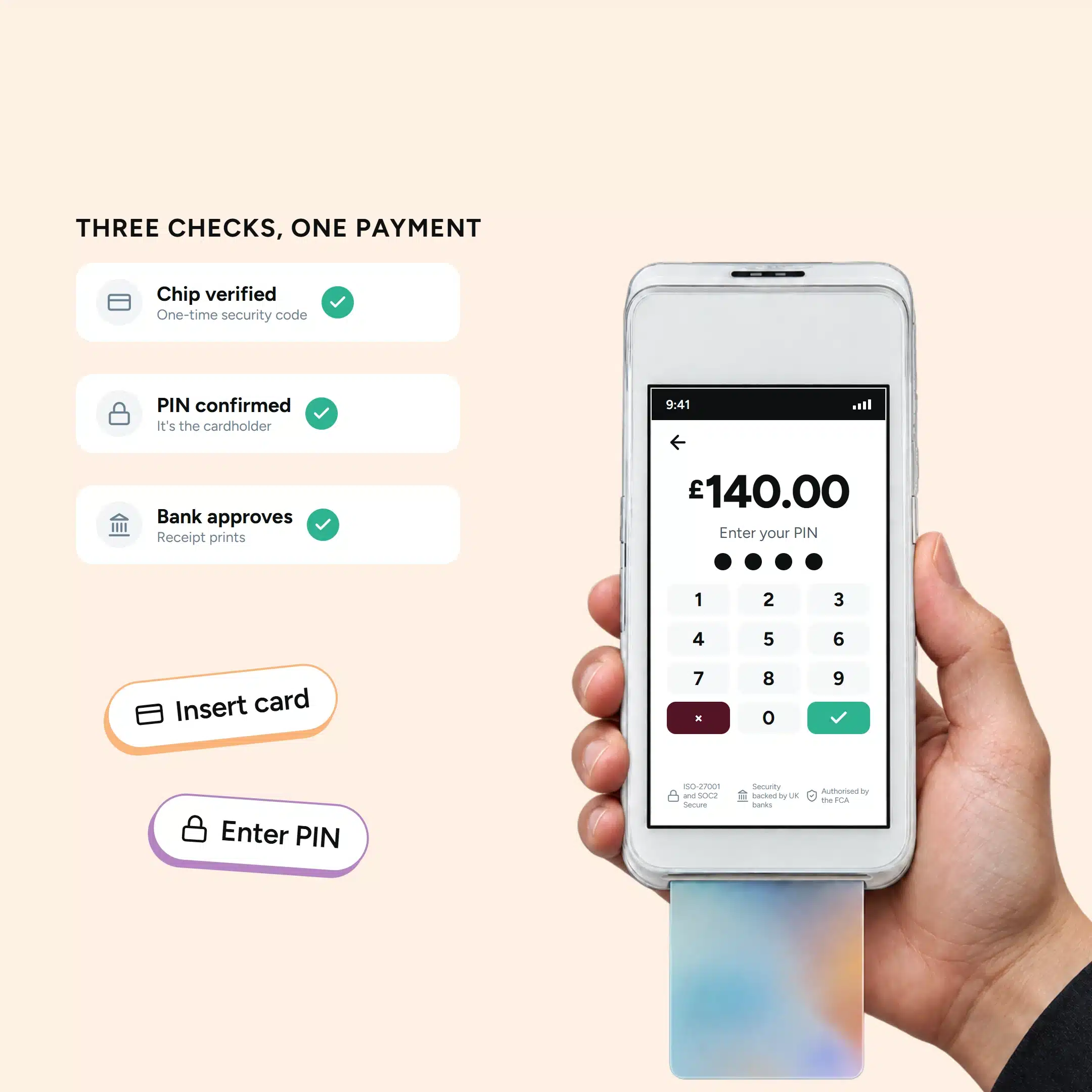
It’s Saturday afternoon and the queue of customer is growing deep. A customer taps their card on a £140 basket, and it fails. So, the terminal asks them to insert it instead. They slide it in, type four digits and the receipt prints. Nothing has gone wrong in it but the payment has moved from contactless to chip and PIN, which is what a card machine is built to do.
A chip and PIN machine is a card terminal that reads the chip in a customer’s card and asks them to type their personal identification number (PIN). The chip proves the card is genuine and creates a one-time code for the sale, the PIN shows the person paying is the cardholder, and the customer’s bank approves or declines. UK Finance says chip and PIN still accounts for 30% of UK credit and debit card payments by value.
In this blog, we will discuss what are chip and PIN machines, how it works, why it still matters after the 2026 contactless change, and what staff should do when a card won’t go through.
What Is a Chip and PIN Machine?
A chip and PIN machine accepts card payments through an inserted chip card when the customer enters a personal identification number (PIN), usually four digits for UK cards, and approves.
The chip helps authenticate the card using a security code for each transaction. The PIN provides a separate check that the payer knows the card’s secret number.
Most modern terminals also accept contactless cards and supported mobile wallets. Staff may call the same device a card reader, payment terminal or PDQ machine.
The machine handles payment requests, while the provider manages the wider processing service. That service includes transaction reporting and the arrangements for paying the business.
How Does a Chip and PIN Transaction Work?
The customer inserts their card, enters their PIN and waits for the result. Behind the screen, the terminal exchanges information with the chip and payment processing systems.
For a typical online-authorised sale, the process follows these steps:
- The sale amount reaches the terminal. Staff enter it manually, or the connected till sends it automatically.
- The customer inserts their payment card. The terminal reads the chip and establishes the supported payment checks.
- The customer enters their PIN privately. Depending on the card, verification happens through the chip or issuing bank.
- The chip generates a transaction security code. The payment request travels through the processor and card network to the issuer.
- The issuer approves or declines the request. The terminal displays the result and prompts the customer to remove their card.
- Staff confirm the sale has completed. They offer a receipt and check the payment appears in the transaction records.
The EMV chip’s security code is specific to that transaction. EMV stands for Europay, Mastercard and Visa, the organisations behind the original standard.
Some cards verify the PIN locally through the chip. Other cards use encrypted PIN information for verification by the issuer. These are called offline PIN and online PIN respectively.
PIN verification and payment approval are separate parts of the process. A correct PIN can still be followed by a declined payment.
When Does the Business Receive the Money?
An approved payment confirms authorisation, while payout follows the provider’s agreed schedule. Staff should distinguish the completed sale from the later bank deposit.
For example, several card payments may arrive together in one payout. The settlement report explains which transactions, fees and adjustments make up that amount.
Why Contactless Sometimes Switches to Chip and PIN
A contactless payment may require chip and PIN because of security checks or limits. Customer settings, new-card activation and card damage can also affect tapping.
The terminal message should guide the next step at checkout. Asking the customer to insert their card often resolves a routine authentication request.
What Changed With UK Contactless Limits in 2026?
From 19 March 2026, eligible firms gained flexibility over contactless card limits. The FCA’s contactless rules require strong fraud controls for firms using that flexibility.
The change allows providers to decide whether and when to adjust limits. The FCA expected most providers to retain existing limits initially.
Higher limits also depend on changes to terminal acceptance and industry rules. UK contactless guidance explains why the regulatory change alone leaves checkout behaviour largely unchanged initially.
At the till, follow the terminal prompt and the provider’s current instructions. Treat the customer’s bank settings and the terminal’s capabilities as separate checks.
Why Can a Small Payment Still Require a PIN?
Banks sometimes request chip and PIN after several contactless payments. Some newly issued cards also require an initial chip and PIN transaction.
These contactless activation and security checks can affect purchases below the usual spending limit. A request for PIN entry therefore says little about the customer’s available balance.
Mobile wallets follow different verification arrangements, often using fingerprints or facial recognition. Supported wallet payments can exceed the physical card’s contactless limit.
Which Type of Chip and PIN Machine Fits the Business?
Choose a terminal around where customers pay and which connections work reliably. Battery life and till integration matter more during busy periods than during a demonstration.
| Machine type | Where it fits | What to check |
|---|---|---|
| Countertop terminal | Fixed checkouts and reception desks | Wired connectivity, customer reach and till integration |
| Portable terminal | Restaurant tables and shop floors | Wi-Fi coverage, battery life and charging arrangements |
| Standalone mobile terminal | Events, deliveries and changing locations | Mobile coverage, SIM charges and backup connectivity |
| Phone-paired chip reader | Small stalls and occasional off-site sales | Compatible phone, Bluetooth connection and both devices’ batteries |
Some devices combine portable and mobile functions through Wi-Fi and cellular connections. Ask which connections the supplied model and service plan actually include.
A phone-paired chip reader has a physical slot for inserted cards. Tap-to-phone services accept contactless payments through supported phones, using a different setup.
What Should Businesses Check Before Choosing a Terminal?
- Test the connection where customers actually pay, including tables and outdoor areas.
- Check which cards and mobile wallets the payment agreement covers.
- Confirm whether the till sends amounts directly to the payment terminal.
- Ask how refunds, failed payments and replacement devices are handled.
- Check customer accessibility, including keypad visibility, screen readability and positioning.
- Review reporting by branch, terminal and staff role for multiple locations.
How Much Does a Chip and PIN Machine Cost?
The total cost combines hardware, transaction fees and any service charges. A purchase price covers only one part of accepting card payments.
Compare quotes using the same monthly sales and card mix. Include overseas cards, business cards and the number of terminals required.
| Cost to compare | Question to ask |
|---|---|
| Terminal purchase or rental | What will the hardware cost over the intended ownership period? |
| Payment processing | Which percentages and fixed fees apply to each card category? |
| Software and reporting | Which functions need an additional monthly subscription? |
| Connectivity and support | Are mobile data and replacement devices included? |
| Contract terms | What happens when the business changes or closes the agreement? |
| Refunds and disputes | Which charges remain when a payment is refunded or challenged? |
Atoa’s guide to card machine costs covers these wider charges. Use actual transaction records when estimating the likely monthly bill.
How to Use a Chip and PIN Machine at the Till
A consistent routine helps staff complete payments and handle delays calmly. Keep the customer informed while following the instructions on the terminal.
- Check the amount displayed before handing the terminal to the customer.
- Ask them to insert their card when the screen requests it.
- Give them space to enter their PIN and shield the keypad.
- Wait for the result before treating the sale as completed.
- Follow the removal prompt, then offer a paper or digital receipt.
The customer should enter their own PIN throughout the transaction. Staff should keep PINs out of conversations, written records and support messages.
For touchscreen devices, learn the terminal’s supported accessibility functions before busy periods. Accessible PIN entry helps customers complete payments independently and privately.
What Should Staff Do When a Card Payment Fails?
Start with the message shown on the chip and PIN terminal. A declined payment, unreadable chip and connection error need different responses.
| What staff see | What to do next |
|---|---|
| The terminal requests card insertion | Ask the customer to insert their card and follow the prompts. |
| The payment is declined | Offer another payment method and suggest contacting the card issuer. |
| The customer has forgotten their PIN | Suggest another payment method rather than repeated guesses. |
| The PIN is blocked | Ask the customer to follow their bank’s PIN recovery process. |
| The terminal cannot read the chip | Check insertion direction, then follow the provider’s troubleshooting instructions. |
| The connection fails during payment | Check transaction status before starting another payment attempt. |
A connection error can leave the outcome unclear to staff. Check the terminal history or provider dashboard before asking the customer to pay again.
If a payment remains pending, contact the provider for its recommended next step. A banking-app screenshot alone may show an authorisation rather than a completed payment.
When several customers experience the same problem, check terminal power and connectivity. Record the error message and time so support can investigate the affected transaction.
How Secure Are Chip and PIN Payments?
Chip technology makes copying usable payment credentials harder than with magnetic-stripe transactions. The changing security code helps protect against counterfeit cards.
PIN entry adds another check when a physical card is used. However, a stolen card and compromised PIN can still create fraud risks.
Give customers room to shield the keypad and inspect terminals for suspicious changes. Keep devices updated through the approved provider process, and report unfamiliar attachments promptly.
Chip and PIN payments can still face disputes or chargebacks. Keep receipts and relevant sales records available for the provider’s dispute process.
When Did Chip and PIN Start in the UK?
Chip and PIN became the standard for UK card payments on 14 February 2006. This followed trials and a staged rollout during the preceding years.
The UK chip and PIN anniversary marked twenty years of use in February 2026. Signature verification remains relevant for certain cards and accessibility arrangements.
Today, chip and PIN works alongside contactless cards and mobile wallets. It remains useful when customers prefer PIN entry or the terminal requests verification.
Taking Chip and PIN Payments With Atoa
Atoa’s chip and PIN machine uses the PAX A920 Pro terminal. It supports chip and PIN, contactless cards and compatible mobile wallets.
The portable device connects through Wi-Fi or mobile data. Its touchscreen and built-in receipt printer support counter payments and service around the premises.
In-person card payments start from 1.3%, with rates depending on the agreed card mix. Rapyd Payments Limited provides the card-payment services through Atoa’s platform.
The same terminal can display a QR code for Pay by Bank payments. Customers scan it and approve payment through their supported banking app.
In-person Pay by Bank starts from 0.7% plus VAT. These payments fall outside card-scheme chargebacks, while refund obligations and applicable bank-payment protections remain.
For several locations, check how terminal records feed into the shared dashboard. Ask for a demonstration using a sale, a refund and a day’s payout.
Conclusion
A successful checkout depends on staff understanding the amount, terminal prompts and final result. Accurate payment records then help finance teams match sales with payouts.
Before the next busy shift, review where your team needs extra help. Test a completed sale, an unclear result and a refund with your payment provider. Those everyday situations reveal whether your setup supports each till and location.
Frequently Asked Questions About Chip and PIN Machines
What Is the Difference Between Chip and PIN and Contactless?
Chip and PIN uses an inserted card and the customer’s PIN. Contactless uses a card or supported device held near the reader.
Why Does Contactless Fail While Chip and PIN Works?
The card may need a security check, activation or a different payment limit. Customer settings and damage to the card’s contactless antenna can also affect tapping.
Is There a £100 Limit on Chip and PIN?
Chip and PIN can support payments above £100. Approval depends on available funds, card controls and the provider’s transaction limits.
Can a Chip and PIN Machine Accept Apple Pay?
Most modern terminals support Apple Pay through their contactless reader. Acceptance depends on the terminal, supported cards and the payment provider’s setup.
Can Chip and PIN Work Without an Internet Connection?
Some setups allow limited offline authorisation under specific card and provider rules. Check the provider’s terms before relying on offline payments during connection failures.
Does Entering the Correct PIN Guarantee Approval?
A correct PIN verifies one part of the transaction. Funds, card restrictions or security checks can still lead to a decline.
Which Chip and PIN Machine Suits Several Business Locations?
Choose terminals with reliable connectivity and reporting organised by location. Check staff permissions, till integration and how payouts match individual transactions.
SHARE ARTICLE
Share link copied!